Thanks to modern AI photo editing tools, it’s now possible to add a deceased loved one to a family photo. This technology allows our loved ones to remain part of our story, keeping them close in every chapter, from weddings to anniversaries.
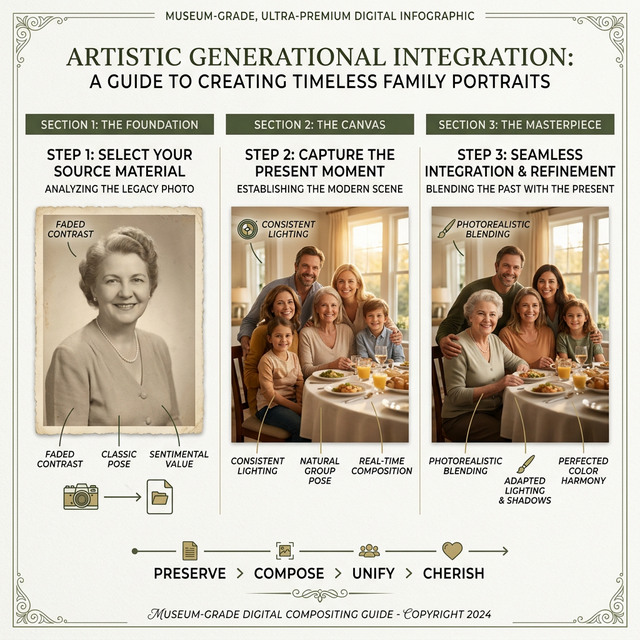
How to Add a Deceased Loved One Into Any Photo — No Photoshop Required
Our studio utilizes modern AI deceased loved one to photo app features. You can easily combine photos by adding departed family members to your wedding portraits, holiday cards, and reunions. We provide an easy, browser-based way to bring these visions to life—no complicated software required. Identifying how to add someone to a photo online has never been simpler.
Success Factors for Your Photo
- Simplicity — Drag-and-drop interface for ease of use.
- Neural AI Cutout — High-precision background removal.
- Perspective Tools — Natural positioning into your scene.
- Spiritual Glow — Optional effects for a gentle appearance.
The Detailed Step-by-Step Guide
Prepare Your Source Material
First, gather your two primary high-resolution images:
- The Base Canvas: A library of memories—wedding, holiday, or family gathering photo.
- The Memorial Photo: Find a clear, front-facing image of your loved one. Good lighting is key for a realistic result.
Upload to the Portal
Visit our digital studio. You can easily add a person to a photo on iPhone by uploading directly from your camera roll. You can also import from Google Photos or physical scans.
Layer the Canvas
Adjust the aspect ratio to match your base photo. Layer the memorial image onto the base. Our add deceased loved one to photo ai free tool helps you see the initial placement before processing.
Extract the Subject with Precision
Activate the AI Image Background Remover. Our neural engine isolates the person, ensuring every strand of hair and clothing edge is preserved for uncompromising photorealism.
Neural Harmonization
Position your deceased loved one in the photo. Slightly reduce the opacity if you desire a "guardian" look, or keep it at 100% for an indistinguishable, lifelike appearance.
Ambient Effects (Optional)
Apply a Soft Glow or stroke for a celestial finish. This works exceptionally well for add deceased loved one to wedding photo projects, creating a gentle tribute.
Reconstruct a
Brand New Legacy
Don't be limited by existing photos. You can combine a loved one and yourself onto an entirely new, artistic background—like a serene beach or a mountain peak—to create a vision of beauty.
Forever Connected Through
Masterful Artistry
"Love doesn’t end when someone passes! Memories may fade, but a well-crafted photo can keep the connection alive for years to come. Love never really leaves—across years, miles, and even the divide between life and death."
100% Secure & Private Processing